

Advanced Functions
Specific REST APIs for data downloading, clipping and geoprocessing are developed in order to guarantee the interoperability
To ensure platform interoperability, APIs based on the REST paradigm have been implemented.
Functions can be invoked through HTTPS requests using GET or POST methods, and data are delivered in several formats compliant with OGC-approved standards.
To use the APIs, users can rely on tools such as cURL or Postman, or integrate Drought Central services into their own development frameworks (C, Java, Python, etc.).
GENERAL INFO
Account creation
To access download and processing services via API calls or software tools (cURL, Postman, etc.), users must register by sending an email to info@droughtcentral.it to request credentials.
The request must include:
- first name
- last name
- affiliated institution or company
- intended use of the data
Available products
The provided functions operate on datasets—both original and derived—stored within the Drought Central database. The products available through the APIs, along with the corresponding tags to be used in requests, are:
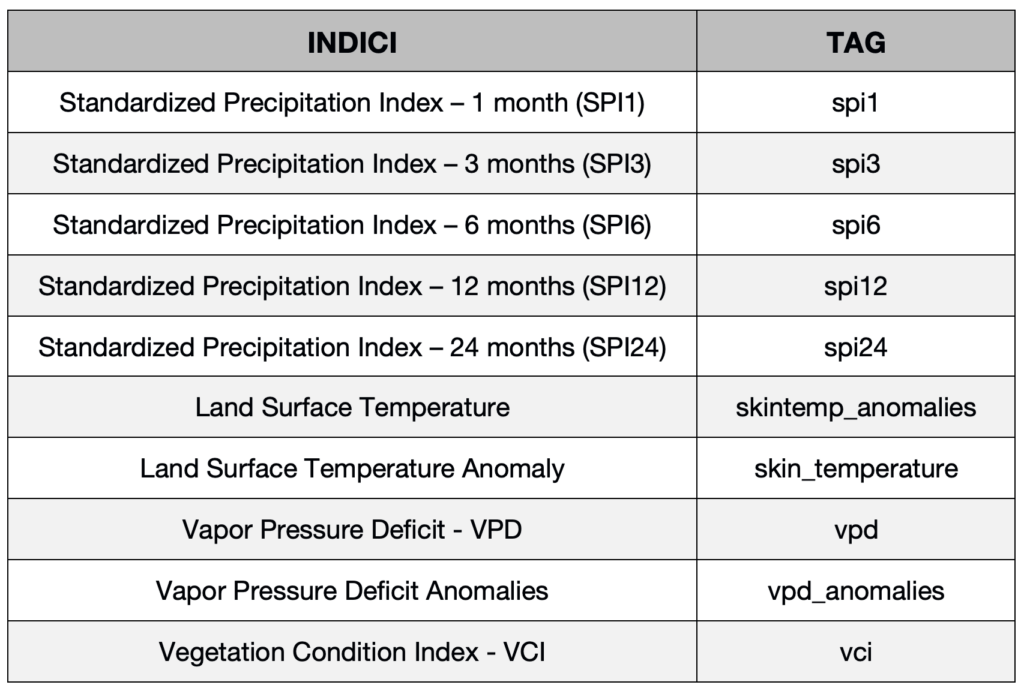
SIMPLIFIED DATA ACCESS
To facilitate data access and usage, a Postman template (Configuration file) has been prepared, including all available services. To use it, you need to download the Postman software and import the configuration file:
Documentation to use the template
COMING SOON
Authentication
At first access, users must correctly configure authentication variables in the Postman structure by entering their credentials (email and password) in the “Variables” section of the template, as described in the downloadable Documentation.
DATA ACCESS VIA DIRECT API USE
"Access token" and "Refresh token"
Access to the APIs is protected through token-based authentication. All requests must include an Access token in the request header. The Access token is valid for 10 minutes, after which it must be renewed using the Refresh token.
When making the first request, or if the refresh token has expired, the authentication service (endpoint user) must be invoked, as described below.
Access token and Refresh token generation
Request type: POST
url : https://dows.ibe.cnr.it:8443/dows-2-0/api/authentication/user
Function to generate a valid Access token and Refresh token for the active user account:
- Username: user’s email
- Password: password
Parameters must be passed in the request body as entity (FORM URLENCODED). This function will generate a new Access token and a new Refresh token.
If authentication is successful, the two tokens are returned in JWT format within the following JSON object:
{“access_token”:”TOKEN CODE”, “refresh_token”:”TOKEN CODE”}
The new Access token is valid for 10 minutes and must then be regenerated via a refresh request (endpoint refresh). The Refresh token is valid for 20 days; after expiration, the session ends and the user service must be called again to generate two new tokens.
If authentication fails, the response message will be: “Unauthorized”.
Example request (cURL) to generate tokens:
curl -X POST –data ‘username=nome.cognome@xxx.it‘ –data ‘password=XXXXXX’ -H ‘Content-
Type: application/x-www-form-urlencoded’ https://dows.ibe.cnr.it:8443/dows-2.0/api/authentication/user
Access token refresh
Request type: POST
url : https://dows.ibe.cnr.it:8443/dows-2-0/api/authentication/refresh
This function regenerates the Access token when it has expired. Using the Refresh service requires including the Refresh token in the request body; additionally, the request header must include:
content-type: text/plain
The response is returned as a JSON object with the following possible cases:
1- Refresh token still valid → new Access token generated
{“result”:”refresh”,”access_token”:”NEW TOKEN”}
2- Access token still valid → no regeneration
{“result”:”alive”,”access_token”:”OLD TOKEN”}
3- Both tokens expired → re-authentication required
{“result”:”death”}
Example request (cURL) to refresh the Access token:
curl -X POST –data “REFRESH TOKEN” -H “Content-Type: text/plain” https://dows.ibe.cnr.it:8443/dows-2.0/api/authentication/refresh
Using the Access token in API requests
When calling any Drought Central service, a valid Access token must be included in the request header as follows:
Authorization:VALID_ACCESS_TOKEN
Example request (cURL) to retrieve available dates for the SPI1 index:
curl -X GET ‘https://dows.ibe.cnr.it:8443/dows-2.0/api/info/data/spi1′ -H ‘Authorization: VALID_ACCESS_TOKEN’
Documentation for API services implementation
The following document describes how to implement and use the available API services.
Documentation
COMING SOON